Frequently asked questions
All you need to know...
FAQs broken down into easy to follow sections to help you get the answers you need.
About our courses
How are our courses delivered?

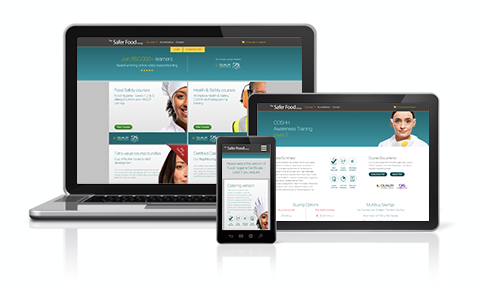
Which devices do your training courses work on?
You can access training on any electronic device as long as it has both an internet browser and internet connection.
Are your courses accredited?
Yes, our courses are accredited by Qualifi, an Ofqual Regulated Awarding Body and also certified by CPD (Continuing Professional Development) To check the accreditation of a particular course, please visit the relevant course page.

Quick link: Accreditation page
Are your courses accepted by EHOs?
Yes, we work with industry experts, including Environmental Health Officers, to ensure that our training meets the necessary standards and covers all the content required to be able to prepare and serve food safely.

How often are your courses updated?
Our courses are reviewed on a three yearly cycle, but if any significant changes to practice or legislation occur, they will be updated as soon as possible to ensure your training is always up-to-date and relevant.
How long will it take me to complete the course?
The time taken to complete the course is very dependant on the skills, experience and learning style of each learner.
Average timescales:
Level 1 courses will require 1-2 hours
Level 2 courses will require 2-4 hours
Level 3 courses will require 18-24 hours
FastTrack rapid pass allows experienced learners to renew their certificates quickly. If you choose the FastTrack option, we’ll test your knowledge, and unlock the exam as soon as you’re ready to take it.

How many days do I have to complete the course?
From the day of activating your course, you have:
Level 1 courses have 30 days access
Level 2 courses have 30 days access
Level 3 courses have 90 days access
How long is my certificate valid for?
It is recommended that you renew your training every 3 years, but you may want to renew more regularly than this.
How do I renew my training?
If you previously used us for your training simply log in to your learner account where you will be able to renew your training from there.
PLEASE NOTE: If you have not used The Safer Food Group before simply purchase a course and a Learner account will be created for you on payment.
Quick link: Log in page
Can I take your courses if I don't live in the UK?
Yes of course! Just check that the course you have chosen covers the legislation in your country.
EU / UK legislation has been designed to ensure food operators work to the highest food safety standards. This legislation is reflected in best practice and process taught within Safer Food Group courses.
Can I access the training material after I have completed my course?
No, once you have gained your certificate, you will no longer have access to the training material.
Account types
What is a learner account?
A learner account is a type of account designed for one individual, allowing them to keep all their learning records in one place. They can access courses, pass certificates and training history plus download any receipts any time they like.
Our learner accounts will let you know when time is running out on a courses access, give you unlimited exam retakes and also drop you a reminder when your training is due for renewal.
How can I create a learner account?
To create an account, simply buy a course or register a course code. Your learner account will be created automatically from your registration details.
What is a business account?
A business account allows you to purchase course codes on behalf of your team or staff. Once they register a course code, you can track their course progress and access a copy of their certificate upon completion.
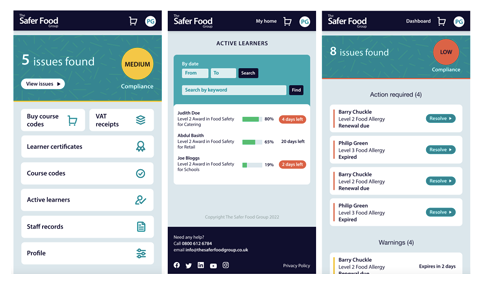
It’s the perfect solution for keeping full training records, it shows you who is doing well and who is struggling, it even reminds you when a staff members training needs renewing.
Business accounts are a great way to demonstrate to your EHO that your staff are fully trained and that their knowledge is up to date – with just one click of a button!
How do I create a business account?
Creating a business account is simple. If you purchase more than one unit of any course, a business account will automatically be created for you. If you purchase single units of two of more courses, you will be asked if you require a business account before you complete your purchase.
If you’d like any advice about creating a business account before you complete your purchase, please contact us on
Purchasing courses
How do I buy courses for myself?
1) Click on the Choose a course drop down menu at the top of our home page OR click the view courses button on the home page for the category of course you require.
2) Select the course you require and the version you would like.
3) Add the course to your basket via the buy now button. Once in your basket you can either click on your basket to checkout or simply continue to add courses to your cart with the above method.
PLEASE NOTE: If you already have a learner account you will need to log in to purchase further courses.
If I buy multiple courses do I receive any discount?
Yes, our multibuy discounts are automatically applied to your orders.
Our courses get cheaper the more you buy!
For example, our Level 2 Food Hygiene pricing structure is as follows:
1-4 courses £14.00+vat Per Course
5 or more £13.00+vat Per Course
10 or more £12.50+vat Per Course
50 or more £9.00+vat Per Course
100 or more £7.00+vat Per Course
Are there any extra costs?
No - once you have purchased your course, there are no hidden, additional costs. Your certificate will be available for download as soon as you have passed your exam, with no extra fees payable.
How do I buy courses for my team?
1) Click on the Choose a course drop down menu at the top of our home page OR click the view courses button on the home page for the category of course you require.
2) Select the course you require and the version you would like.
3) Add the course to your basket via the buy now button.
4) If you have multiple units of any one course you will automatically be given a business account OR if you have just one unit of two or more different courses you will be given the option to create a business account.
5) Within your business account, the codes you have purchased are available in the course codes area. Distribute these to your staff, to enable them to register and start their training.
PLEASE NOTE: If you already have a business account you will need to log in to purchase course codes.
Can I buy a course for someone else?
Yes, if you are ordering 1 course for someone else to complete, please fill out the registration form with their details NOT your own. Do not place the order in your own learner account.
If you have a business account with us, you can order the course in that account, give the course code to your team member and let them register it and create their own account.
How do I pay?
You can pay online at the time of ordering, we accept Visa, Maestro, Mastercard and American Express.
Alternatively, you can pay by BACS. If you prefer this method, select pay by BACS or phone to download your invoice.
Please quote the invoice reference when sending your payment by BACS or call us on
I want to buy courses for my team to complete, how do I do this?
If you already have a business account with us, please log in and order there.
If not, please add the number of courses you need to your basket and complete your order, this will create you a business account.
Quick link: Log in page
How do I buy courses if I am VAT exempt?
We can process that directly with you. Please call us on
Logging in / Registering a course code
I’ve forgotten my username
1) Click on the LOG IN box at the top of the home page.
2) Click the forgotten your username link.
3) Fill out the username request form and press the retrieve username button.
You will shortly receive an email (to your registered email address) containing your username.
Quick link: Forgotten your username page
I’ve forgotten my password
1) Click on the LOG IN box at the top of the home page.
2) Click the forgotten your password link.
3) Enter your registered username into the form and press the send email button.
You will shortly recieve an email (to your registered email address) containing a link to reset your password.
Quick link: Forgotten your password page
I have been given a course code, what do I do now?
1) Click on the REGISTER CODE box at the top of the home page.
2) Type or even better cut & paste your course code into the enter code here box.
3) Click the check code button to ensure the code is for the correct course. If it is not the correct course please contact the person that provided you with the course code.
4) Complete the registration form to gain access to your new learner account and start your course.
PLEASE NOTE: If you already have a learner account with us you will need to login and can register your course code from within your account and keep all your learner records in one place.
Quick link: Register code page
The course code I am trying to register says it has already been registered, what should I do?
If the code has already been registered to you, please log in to your learner account with your username and password.
If the code has not been registered to you, the code may have been registered by someone else. Please go back to the person who supplied you the code and ask them to check their records.
Quick link: Log in page
Exams & certificates
If I don't pass the course exam first time, can I try again?
Yes, don’t worry! You can take the exam as many times as you need at no extra charge.
PLEASE NOTE: We suggest you revisit the training material between tries to ensure you have the knowledge to pass your exam.
How do I get my certificate once I have passed?
On passing your exam you will find a download certificate link in the exam results page. You can also download your pass certificate anytime by logging into your learner account. We do not send out certificates.
Quick link: Log in page
I have lost my certificate, how can I get a replacement?
You can download your pass certificate again anytime by logging into your learner account.
Quick link: Log in page